
1. Introduktion
Tak for købetasing the JVC XVN330B DVD Video Player. This player is designed to provide high-quality video and audio playback from various disc formats. Key features include Digital Direct Progressive Scan output, 192kHz/24-bit audio D/A converter, 10-bit/54MHz video D/A converter, and multi-format compatibility (DVD-R/RW, DVD+R/RW, CD-R/RW, VCD/SVCD, MP3, and JPEG). This manual provides essential information for the safe and efficient operation of your device.
2. Sikkerhedsoplysninger
- Strømkilde: Connect the player only to the specified power supply voltage.
- Ventilation: Sørg for tilstrækkelig ventilation omkring enheden. Bloker ikke ventilationsåbningerne.
- Vand og fugt: Udsæt ikke enheden for regn eller fugt. Placer ikke genstande fyldt med væsker oven på enheden.
- Varme: Hold enheden væk fra varmekilder såsom radiatorer, varmeapparater, komfurer eller andre apparater (herunder ampløftere), der producerer varme.
- Service: Forsøg ikke selv at servicere dette produkt. Overlad al service til kvalificeret servicepersonale.
- Diskhåndtering: Handle discs by their edges. Avoid touching the playback surface.
3. Pakkens indhold
Bekræft, at alle nedenstående varer er inkluderet i pakken:
- JVC XVN330B DVD Video Player
- Fjernbetjening (med batterier)
- A/V Cable (Composite)
- Betjeningsvejledning (denne vejledning)
4. Produktet er slutview
The JVC XVN330B DVD Video Player features a slim design and a black finish.
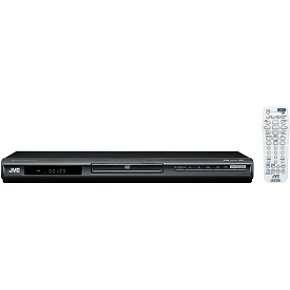
Figur 4.1: Front view of the JVC XVN330B DVD Video Player. This image shows the compact, black chassis with the disc tray, power button, and basic playback controls on the front panel.
4.1 Betjeningselementer på frontpanelet
- Power knap: Tænder eller slukker for afspilleren.
- Diskbakke: Til isætning af dvd'er og cd'er.
- Åbn/Luk-knap: Åbner og lukker diskskuffen.
- Afspil/pause knap: Starter eller sætter afspilning på pause.
- Stop-knap: Stopper afspilning.
- Skip Buttons (Forward/Backward): Skips tracks or chapters.
- Vise: Shows playback information.
4.2 Bagpaneltilslutninger
- Component Video Output (Y, Pb, Pr): For high-quality video connection to compatible TVs.
- S-videoudgang: For improved video quality over composite.
- Kompositvideoudgang (gul RCA): Standard video connection.
- Analog lydudgang (rød/hvid RCA): For stereo audio connection.
- Koaksial digital lydudgang: Til digital lydtilslutning til en receiver eller amplivligere.
- AC strømindgang: Tilsluttes strømkablet.
4.3 Fjernbetjening
The included remote control provides full functionality for operating the DVD player from a distance. It includes buttons for power, disc tray open/close, playback controls (play, pause, stop, fast forward, rewind, skip), menu navigation, volume, and special features. Ensure batteries are correctly inserted.
5. Opsætning
5.1 Tilslutning til et fjernsyn
Choose one of the following connection methods based on your television's available inputs for the best possible picture quality.
- Komponentvideotilslutning (bedste kvalitet):
Connect the Component Video Output (Y, Pb, Pr) jacks on the DVD player to the corresponding Component Video Input jacks on your TV using a component video cable (not included). Ensure colors (green, blue, red) match.
- S-Video-tilslutning (bedre kvalitet):
Connect the S-Video Output jack on the DVD player to the S-Video Input jack on your TV using an S-Video cable (not included).
- Kompositvideoforbindelse (standardkvalitet):
Connect the Composite Video Output (yellow RCA) jack on the DVD player to the Video Input (yellow RCA) jack on your TV using the supplied A/V cable.
5.2 Tilslutning af lyd
Connect the audio outputs from the DVD player to your TV or an audio receiver/amplivligere.
- Analog lydtilslutning:
Connect the Analog Audio Output (red and white RCA) jacks on the DVD player to the corresponding Audio Input jacks on your TV or audio receiver using the supplied A/V cable (for stereo sound).
- Coaxial Digital Audio Connection:
For multi-channel surround sound, connect the Coaxial Digital Audio Output jack on the DVD player to a Coaxial Digital Audio Input on your compatible audio receiver/amplifier using a coaxial digital audio cable (not included).
5.3 Strømtilslutning
After all video and audio connections are made, plug the AC power cord into the AC power input on the rear of the DVD player, then plug the other end into a wall outlet.
6. Betjeningsvejledning
6.1 Grundlæggende diskafspilning
- Tryk på MAGT knappen for at tænde afspilleren.
- Tryk på ÅBN/LUK knappen for at åbne diskskuffen.
- Placer en DVD- eller CD-disk i diskbakken med etiketsiden opad.
- Tryk på ÅBN/LUK Tryk på knappen igen for at lukke diskskuffen. Afspilleren vil automatisk begynde afspilning eller vise diskmenuen.
- Brug fjernbetjeningens navigationsknapper og ENTER to select options from the disc menu.
- Under afspilning, brug AFSPIL/PAUSE, STOP, HURTIG FREM, SPOLE TILBAGE, og SPRINGE knapper efter behov.
6.2 Playing MP3/JPEG Discs
When an MP3 or JPEG disc is inserted, a menu displaying the files and folders will appear.
- Use the navigation buttons on the remote to select the desired file eller mappe.
- Trykke ENTER to open a folder or start playback of a selected file.
- For JPEG slideshows, you can select from 11 visual effects and save an image as a custom startup screen.
6.3 Særlige funktioner
- Progressiv scanning: Provides a smoother, flicker-free picture when connected via component video to a compatible display. Ensure your TV is set to progressive scan mode if applicable.
- PAL Playback on NTSC TV: This player supports playback of PAL-formatted DVDs on NTSC televisions.
- Video Fine Processor: Offers 7 parameters, 2 presets, and 2 manual settings to adjust video output for personalized viewing. Access this feature through the player's setup menu.
- 10-Disc Memory: Allows you to bookmark a specific scene on up to 10 different discs, enabling easy return to that point later.
- Express Play Start: Reduces the time it takes for a disc to begin playing after insertion.
- Track Adjust: Helps ensure noise-free playback of burned discs.
7. Vedligeholdelse
7.1 Rengøring af enheden
- Tør enhedens yderside af med en blød, tør klud.
- Brug ikke slibende rengøringsmidler, voks eller opløsningsmidler, da de kan beskadige finishen.
- Sørg for, at enheden er taget ud af stikkontakten før rengøring.
7.2 Pleje af disken
- Hold diskene i kanterne for at undgå fingeraftryk på spillefladen.
- Rengør diske med en blød, fnugfri klud, og tør forsigtigt af fra midten og udad.
- Brug ikke opløsningsmidler eller slibende rengøringsmidler på diske.
- Opbevar diske i deres etuier for at beskytte dem mod støv og ridser.
8. Fejlfinding
If you experience problems with your DVD player, refer to the following table for possible solutions.
| Problem | Mulig årsag | Løsning |
|---|---|---|
| Ingen strøm | Netledningen er ikke tilsluttet korrekt. | Ensure the power cord is firmly plugged into the player and the wall outlet. |
| Intet billede | Forkert videoforbindelse eller tv-indgang. | Check video cables are securely connected. Select the correct input source on your TV. |
| Ingen lyd | Forkert lydforbindelse eller TV/receiver-lydstyrke. | Check audio cables. Increase volume on TV/receiver. Ensure correct audio input is selected. |
| Disc does not play / Freezes | Disken er snavset, ridset eller har et inkompatibelt format. | Clean the disc. Try a different disc. Ensure the disc format is supported (DVD, CD, MP3, JPEG). |
| Fjernbetjening virker ikke | Batteries are dead or incorrectly inserted. Obstruction between remote and player. | Replace batteries. Ensure line of sight to the player's remote sensor. |
| Disc tray vibrates | Normal operation for some units, or disc not seated properly. | Ensure the disc is centered in the tray. This can sometimes be a characteristic of the unit's build. |
9. Specifikationer
| Feature | Beskrivelse |
|---|---|
| Modelnavn | XVN330B |
| Mærke | JVC |
| Medietype | DVD, CD, DVD-R/RW, DVD+R/RW, CD-R/RW, VCD/SVCD, MP3, JPEG |
| Særlige funktioner | Progressive Scan, Digital Still (JPEG) Slideshow with Music, PAL playback on NTSC TV, Video Fine Processor, 10-Disc Memory, Express Play Start, Track Adjust |
| Video D/A-konverter | 10-bit/54MHz |
| Lyd D/A-konverter | 192kHz/24-bit |
| Video output | Komponentvideo (Y, Pb, Pr), S-video, kompositvideo (RCA) |
| Lydudgang | Analog Stereo (RCA), Coaxial Digital Audio |
| Understøttet lydformat | Dolby Digital (AC-3) |
| Farve | Sort |
| Varens vægt | 5 pund (ca. 2.27 kg) |
| UPC | 046838026287 |
10. Garanti og support
JVC-produkter er fremstillet efter høje kvalitetsstandarder og er dækket af en begrænset garanti. For specifikke garantivilkår henvises til garantikortet, der følger med dit produkt, eller besøg den officielle JVC-side. webwebsted.
For technical assistance, customer service, or to inquire about repairs, please contact JVC customer support through their official channels. Contact information can typically be found on the JVC webwebsted eller i den dokumentation, der fulgte med dit køb.
Online support: www.jvc.com/support (This is a placeholder link, please refer to actual JVC support page)