
1. Introduktion
This manual provides comprehensive instructions for the safe and efficient use of your Logisys PS480D 480W ATX Power Supply. Please read this manual thoroughly before installation and operation to ensure proper functionality and to prevent damage to the unit or other components.

Figure 1: Logisys PS480D 480W ATX Power Supply, front view with cables bundled.
2. Sikkerhedsoplysninger
ADVARSEL: Strømforsyninger indeholder høje volatilitetertage components. Do not open the power supply casing. Der er ingen dele indeni, som kan serviceres af brugeren.
- Sørg for, at strømforsyningen er afbrudt fra stikkontakten før installation eller vedligeholdelse.
- Always ground yourself to prevent electrostatic discharge (ESD) when handling internal computer components.
- Brug ikke strømforsyningen i våde eller tørre omgivelser.amp forhold.
- Sørg for korrekt ventilation omkring strømforsyningen for at forhindre overophedning.
- Use only the provided power cables and connectors.
3. Produktfunktioner
The Logisys PS480D is a 480W ATX power supply designed for personal computers. Key features include:
- Høj effektivitet
- Low Noise & Ripple
- Over Voltage Beskyttelse
- Kortslutningsbeskyttelse
- Built-in EMI Filter
- Insulation Resistance 100MΩ min.
- Complies with FCC part 15J class B 115VAC operation and CISPR 22 230 VAC operation.
- Meets UL 1950, CSA 22.2 LEVEL 3 Requirement.
- 100% Burn-in test / Vibration test / Hi-pot test / Leakage current test.
- MTBF above 100,000 hours at 25 °C.

Figure 2: Rear panel of the power supply with fan, AC inlet, and power switch.
4. Opsætning og installation
Follow these steps to install the Logisys PS480D power supply into your computer system.
- Forberedelse: Ensure your computer is completely powered off and unplugged from the wall outlet. Open your computer case according to its manufacturer's instructions.
- Fjern den gamle strømforsyning (hvis relevant): Disconnect all cables from the old power supply to the motherboard, drives, and other components. Unscrew and remove the old power supply from the case.
- Installer ny strømforsyning: Carefully place the Logisys PS480D into the power supply bay of your computer case. Secure it with screws.
- Tilslut hovedstrøm: Connect the 20+4 pin ATX mainboard connector to your motherboard. If your motherboard uses a 20-pin connector, detach the 4-pin section. If it uses a 24-pin connector, connect both sections.
- Tilslut CPU-strøm: Connect the 4-pin +12V power connector to the corresponding port on your motherboard.
- Tilslut perifer strøm:
- Use the 4-pin standard drive connectors for HDDs and CD/DVD-ROM drives.
- Use the 4-pin 3.5" FDD or ZIP connectors for floppy disk drives or similar devices.
- Use the Serial ATA (SATA) connectors for SATA hard drives and SSDs.
- Kabelstyring: Før kablerne pænt for at sikre korrekt luftgennemstrømning i kabinettet.
- Luk sag: Når alle forbindelser er sikre, skal du lukke computerens kabinet.
- Tilslut vekselstrøm: Plug the AC power cord into the power supply's AC inlet and then into a wall outlet.
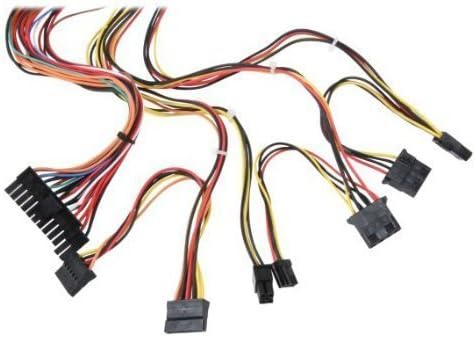
Figur 3: Overview of power supply connectors.

Figure 4: Power supply dimensions and included AC power cord.
5. Betjeningsvejledning
After successful installation, you can power on your computer.
- Ensure the power switch on the rear of the power supply (Figure 2) is in the "ON" (I) position.
- Tryk på tænd/sluk-knappen på computerens kabinet.
- The power supply will provide stable power to your system components.
- To power off, shut down your operating system normally. For complete power disconnection, switch the power supply to the "OFF" (O) position and unplug the AC cord.
6. Vedligeholdelse
Regelmæssig vedligeholdelse er med til at sikre strømforsyningens levetid og optimale ydeevne.
- Rensning: Periodically clean dust from the power supply's fan and vents using compressed air. Ensure the power supply is unplugged before cleaning.
- Luftstrøm: Ensure that the computer case has adequate airflow and that the power supply's fan is not obstructed.
- Kabelintegritet: Periodically check all power cables for secure connections and signs of wear or damage.
7. Fejlfinding
Hvis du støder på problemer med din strømforsyning, kan du se følgende almindelige fejlfindingstrin:
- Ingen strøm:
- Kontroller, om netledningen er korrekt tilsluttet både strømforsyningen og stikkontakten.
- Ensure the power switch on the rear of the power supply is in the "ON" (I) position.
- Kontroller, at stikkontakten fungerer ved at tilslutte en anden enhed.
- Check all internal power connections (20/24-pin ATX, 4-pin +12V, peripheral connectors) are firmly seated.
- Systemustabilitet/Tilfældige nedlukninger:
- This could indicate an overloaded or failing power supply. Ensure your system's power requirements do not exceed the PS480D's 480W capacity.
- Check for proper ventilation and ensure the power supply fan is spinning. Overheating can cause instability.
- Usædvanlig støj:
- A loud fan noise might indicate dust buildup or a failing fan bearing. Clean the fan as described in the Maintenance section.
If problems persist after attempting these steps, contact Logisys customer support or a qualified technician.
8. Specifikationer
| Feature | Specifikation |
|---|---|
| Mærke | Logisys |
| Modelnummer | PS480D |
| Output Wattage | 480 watt |
| Formfaktor | ATX |
| Dimensioner (LxBxH) | 15.24 x 13.97 x 8.25 cm (L x B x H) |
| Varens vægt | 2.06 pund (0.93 kg) |
| Bundkortstik | 1x 20+4 Pin ATX |
| CPU strømstik | 1x 4 Pin +12V |
| Standard Drive Connectors | 4x 4 Pin (Molex) |
| FDD/ZIP Connectors | 1x 4 Pin 3.5" |
| Seriel ATA-stik | 1x SATA |
| Afkølingsmetode | Luft |
| Beskyttelser | Over Voltage Beskyttelse, Kortslutningsbeskyttelse |
| Certificeringer | FCC part 15J class B, CISPR 22, UL 1950, CSA 22.2 LEVEL 3 |
9. Garanti og support
For warranty information, technical support, or service inquiries, please refer to the official Logisys webwebstedet eller kontakt deres kundeserviceafdeling. Behold din købskvittering som købsbevis.