
1. Introduktion
Welcome to the user manual for your new Singing Machine SMVG-620 CD+G Karaoke System. This system is designed to provide hours of entertainment with its CD+G playback capabilities, built-in camera, 5.5-inch monitor, and AM/FM radio. Please read this manual thoroughly before operating your unit to ensure proper use and to maximize your enjoyment.
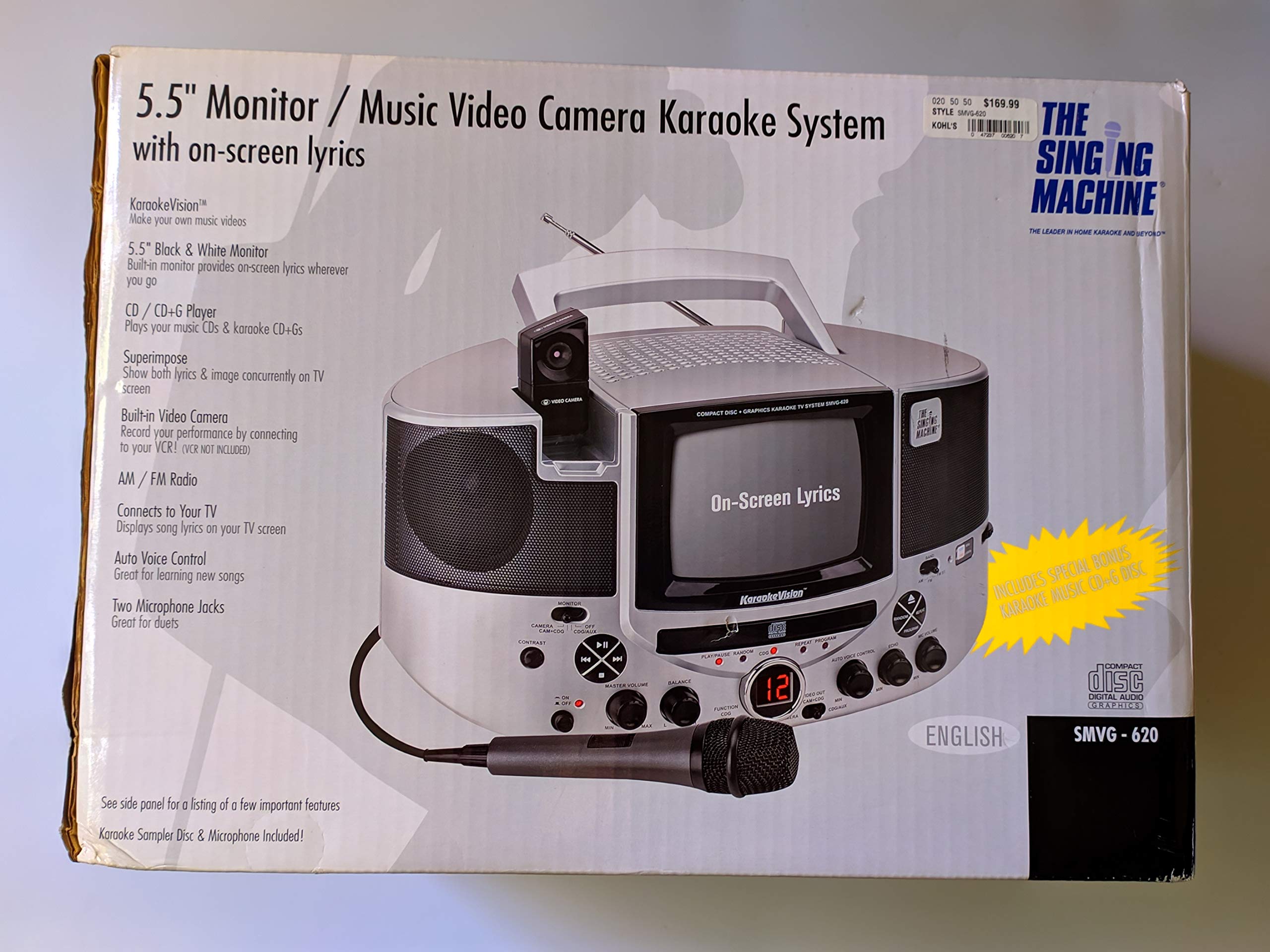
Figur 1.1: The Singing Machine SMVG-620 CD+G Karaoke System.
For optimal performance and safety, always follow the instructions and warnings provided.
2. Vigtige sikkerhedsoplysninger
- Læs instruktionerne: Alle sikkerheds- og betjeningsinstruktioner skal læses, før apparatet tages i brug.
- Gem instruktionerne: Sikkerheds- og betjeningsvejledningen skal opbevares til fremtidig reference.
- Vær opmærksom på advarsler: Alle advarsler på apparatet og i betjeningsvejledningen skal overholdes.
- Følg instruktionerne: Alle betjenings- og brugsanvisninger skal følges.
- Vand og fugt: Brug ikke dette apparat i nærheden af vand.
- Rensning: Rengør kun med en tør klud.
- Ventilation: Bloker ikke ventilationsåbninger. Installer i overensstemmelse med producentens anvisninger.
- Varme: Må ikke installeres i nærheden af varmekilder såsom radiatorer, varmeapparater, komfurer eller andre apparater (inklusive ampløftere), der producerer varme.
- Strømkabelbeskyttelse: Beskyt netledningen mod at blive trådt på eller klemt, især ved stik, stikkontakter og det sted, hvor de kommer ud af apparatet.
- Vedhæftede filer/tilbehør: Brug kun tilbehør/tilbehør specificeret af producenten.
- Lyn: Træk stikket ud af dette apparat under tordenvejr, eller når det ikke skal bruges i længere perioder.
- Service: Overlad al service til kvalificeret servicepersonale. Service er påkrævet, når apparatet er blevet beskadiget på nogen måde.
3. Pakkens indhold
Carefully unpack your Singing Machine SMVG-620 system and ensure all items listed below are present and in good condition.
- SMVG-620 CD+G Karaoke System
- One (1) Microphone
- Sampler CD+G Disc
- Audio/Video RCA Cables
- AC strømadapter
- Instruktionsmanual

Figur 3.1: Contents of the box, including the microphone, RCA cables, and the instruction manual.
4. Produktet er slutview
Familiarize yourself with the various parts and controls of your SMVG-620 Karaoke System.

Figur 4.1: Bag view of the product packaging highlighting key features and components of the SMVG-620 system.
Nøglefunktioner:
- 5.5" Black & White Monitor: For on-screen lyrics from CD+G discs.
- Built-in Color Camera: Allows you to see yourself on the monitor or connected TV.
- Dual Microphone Jacks: Connect two microphones for duets (one microphone included).
- AM/FM radio: Stil ind på dine yndlingsradiostationer.
- CD+G afspiller: Plays standard audio CDs and CD+Graphics discs.
- Automatisk stemmestyring (AVC): Helps maintain vocal balance by automatically reducing the main vocal track when you sing.
- Ekkokontrol: Adds depth and resonance to your voice.
- Professional Style Microphone: For clear vocal pickup.
- Lyd/video output: Connects to your TV for larger screen display and enhanced audio.
5. Opsætning
5.1 Strømtilslutning
- Sørg for, at enheden er placeret på en stabil, plan overflade.
- Connect the AC power adapter to the DC IN jack on the back of the SMVG-620 unit.
- Sæt den anden ende af strømadapteren i en almindelig stikkontakt (120 V ~ 60 Hz).
5.2 Tilslutning til et fjernsyn
Til view lyrics on a larger screen and enhance audio, connect the SMVG-620 to your television using the supplied Audio/Video RCA cables.
- Locate the AUDIO OUT (white and red) and VIDEO OUT (yellow) jacks on the back of the SMVG-620.
- Connect the white plug of the RCA cable to the white AUDIO OUT jack on the karaoke system and to the white AUDIO IN jack on your TV.
- Connect the red plug of the RCA cable to the red AUDIO OUT jack on the karaoke system and to the red AUDIO IN jack on your TV.
- Connect the yellow plug of the RCA cable to the yellow VIDEO OUT jack on the karaoke system and to the yellow VIDEO IN jack on your TV.
- Turn on your TV and select the correct A/V input source (e.g., AV1, Video 1) that corresponds to the jacks you used.
5.3 Mikrofonforbindelse
Plug the microphone into either the MIC 1 or MIC 2 jack on the front of the SMVG-620 unit.
6. Betjening
6.1 Tænd/sluk
Tryk på MAGT button located on the front panel to turn the unit ON or OFF.
6.2 CD+G Playback
- Open the CD compartment door and carefully place a CD+G disc (or standard audio CD) onto the spindle with the label side facing up. Close the door.
- Vælge CD+G mode using the FUNCTION selector.
- Tryk på AFSPIL/PAUSE knappen for at starte afspilning.
- Juster MASTER VOLUME dreje til det ønskede lytteniveau.
- Brug SPRINGE knapper (<< or >>) for at navigere mellem spor.
- Tryk på for at holde pause AFSPIL/PAUSE igen. Tryk igen for at genoptage.
- Tryk på for at stoppe afspilningen STOP knap.
6.3 Brug af mikrofon
- Ensure the microphone is connected to a MIC jack.
- Juster MIC LYDSTYRKE knap til at styre mikrofonens udgangsniveau.
- Drej på EKKO knappen for at tilføje en ekkoeffekt til din stemme.
- De AUTO VOICE CONTROL (AVC) switch can be toggled ON/OFF. When ON, the original vocal track on a CD+G disc will be reduced when you sing into the microphone.
6.4 AM/FM-radio
- Vælge AM or FM mode using the FUNCTION selector.
- Træk FM-antennen ud for bedre modtagelse.
- Drej på TUNING knappen for at vælge den ønskede radiostation.
- Juster MASTER VOLUME knop.
6.5 Kamerafunktion
The built-in camera allows you to display your image on the 5.5-inch monitor or a connected TV.
- Ensure the unit is powered on and connected to a TV if you wish to use an external display.
- The camera feed will automatically display when the unit is in CD+G or Video mode, or when no other video source is active.
7. Vedligeholdelse
7.1 Rengøring af enheden
- Tag altid stikket ud af stikkontakten før rengøring.
- Brug en blød, tør klud til at rengøre de udvendige overflader.
- Brug ikke slibende rengøringsmidler, voks eller opløsningsmidler, da de kan beskadige finishen.
- Brug en specialiseret CD-linserenser til CD-linser.
7.2 CD-pleje
- Hold cd'er i kanterne for at undgå fingeraftryk på spillefladen.
- Keep discs in their cases when not in use to prevent scratches.
- Rengør diske med en blød, fnugfri klud, og tør af fra midten og udad.
8. Fejlfinding
If you encounter any issues with your SMVG-620, please refer to the following common problems and solutions.
| Problem | Mulig årsag | Løsning |
|---|---|---|
| Ingen strøm | Netledningen er ikke tilsluttet korrekt. | Sørg for, at AC-adapteren er korrekt tilsluttet enheden og en fungerende stikkontakt. |
| Ingen lyd fra højttalerne | Master Volume is too low. Forkert funktionstilstand valgt. | Øg MASTER VOLUME. Select the correct FUNCTION (CD+G, AM, FM). |
| Ingen lyd fra mikrofonen | Mikrofonen er ikke tilsluttet. MIC VOLUME is too low. Mikrofonkontakten er OFF. | Plug microphone into MIC 1 or MIC 2 jack. Increase the MIC VOLUME. Ensure microphone switch is ON. |
| No video on TV / No lyrics | RCA-kabler er ikke tilsluttet korrekt. Forkert tv-indgang valgt. Not a CD+G disc. | Check all RCA cable connections (yellow for video). Select the correct A/V input on your TV. Ensure you are playing a CD+G disc for lyrics. |
| CD skipping | Disken er snavset eller ridset. Enheden er på en ustabil overflade. | Rengør disken, eller prøv en anden disk. Place the unit on a stable, vibration-free surface. |
9. Specifikationer
| Modelnummer | SMVG-620 (SIN SMVG620) |
| Strømkilde | AC 120V ~ 60Hz (via AC Adapter) |
| Overvåge | 5.5-inch Black & White |
| Talertal | 2 |
| Kompatible enheder | Television |
| Medietype | CD, CD+G |
| Produktmål (LxBxH) | 35.8 x 20.8 x 19.3 cm (14.1 x 8.2 x 7.6 tommer) |
| Varens vægt | 3.9 kg (8.6 lbs) |
10. Garanti og support
For warranty information and customer support, please refer to the warranty card included with your product or contact The Singing Machine directly. You may also consult your retailer for details regarding their return and warranty policies.
Fabrikant: SANGMASKINEN