
1. Introduktion
Tak for købetasing the GPX BCD2004 Boombox. This portable audio system features a top-loading CD player and an AM/FM tuner, designed for versatile audio playback. This manual provides essential information for setting up, operating, and maintaining your device to ensure optimal performance and longevity.
2. Sikkerhedsoplysninger
- Læs instruktionerne: Carefully read all operating instructions before using the unit.
- Gem instruktionerne: Gem denne vejledning til fremtidig reference.
- Vand og fugt: Udsæt ikke dette apparat for dryppende eller stænkende vand. Placer ikke genstande fyldt med væsker, såsom vaser, oven på apparatet.
- Ventilation: Sørg for tilstrækkelig ventilation. Bloker ikke ventilationsåbninger.
- Varme: Må ikke placeres i nærheden af varmekilder såsom radiatorer, varmeapparater, komfurer eller andre apparater (herunder ampløftere), der producerer varme.
- Strømkilder: Use only the power source indicated on the appliance.
- Batterier: Follow battery safety guidelines. Do not mix old and new batteries, or different types of batteries. Remove batteries if the unit is not used for extended periods.
- Service: Overlad al service til kvalificeret servicepersonale.
3. Pakkens indhold
Kontroller venligst, at følgende varer er inkluderet i din pakke:
- GPX BCD2004 Boombox Unit
- AC strømledning
- Brugermanual
4. Betjeningselementer og funktioner ovenforview
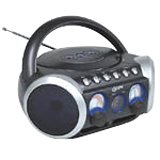
Figur 1: Front view of the GPX BCD2004 Boombox. This image shows the overall design of the boombox, including the speaker grilles and the general layout of the front panel.
Familiarize yourself with the main controls and features of your boombox:
- CD-rum: Top-loading bay for inserting CDs.
- Funktionskontakt: Selects between CD, AM, FM, and OFF modes.
- Lydstyrkekontrol: Rotary dial to adjust the audio output level.
- Indstillingsskive: Rotary dial for selecting AM or FM radio frequencies.
- Afspil/pause knap: Starts or temporarily stops CD playback.
- Stop-knap: Stopper CD-afspilning.
- Spring over/søg-knapper (◀◀ / ▶▶): Skips to the previous/next track or searches within a track.
- Program knap: Used to program a sequence of tracks for CD playback.
- Gentag knap: Repeats the current track or the entire CD.
- AM/FM-antenne: Telescopic antenna for FM reception, internal antenna for AM.
- AC strømindgang: Jack for connecting the AC power cord.
- Batterirum: Located on the bottom or rear for 'C' batteries.
- Fold-down Carrying Handle: For nem transport.
5. Opsætning
5.1 Strømforsyning til enheden
Your GPX BCD2004 Boombox can be powered by either AC power or batteries.
Drift med vekselstrøm
- Ensure the Function Switch is in the OFF position.
- Insert the small end of the AC power cord into the AC power input jack on the back of the unit.
- Plug the other end of the AC power cord into a standard AC wall outlet (120V ~ 60Hz).
Batteridrift
For portable use, the boombox requires 8 'C' size batteries (not included).
- Ensure the Function Switch is in the OFF position.
- Åbn batteridækslet, der er placeret i bunden eller bagsiden af enheden.
- Insert 8 'C' size batteries, observing the correct polarity (+ and -) as indicated inside the compartment.
- Luk batterirummets dæksel forsvarligt.
- Note: When operating on battery power, disconnect the AC power cord from the unit.
6. Operating the CD Player
The GPX BCD2004 is compatible with standard audio CDs, CD-R, and CD-RW discs.
6.1 Ilægning af en cd
- Løft lågen til cd-rummet, der er placeret øverst på enheden.
- Place a CD onto the center spindle with the label side facing up.
- Luk forsigtigt lågen til cd-rummet, indtil den klikker i.
6.2 Grundlæggende CD-afspilning
- Indstil funktionskontakten til CD-positionen.
- The CD player will begin to read the disc. The track number will typically display.
- Press the PLAY/PAUSE (▶/██) button to start playback.
- Adjust the Volume Control to your desired listening level.
- To pause playback, press the PLAY/PAUSE (▶/██) button. Press it again to resume.
- To stop playback, press the STOP (■) button.
6.3 Skipping and Searching Tracks
- Spring spor over: During playback, press the SKIP/SEARCH FORWARD (▶▶) button to go to the next track. Press the SKIP/SEARCH BACKWARD (◀◀) button to go to the beginning of the current track, or press it twice to go to the previous track.
- Search Within Track: During playback, press and hold the SKIP/SEARCH FORWARD (▶▶) or SKIP/SEARCH BACKWARD (◀◀) button to fast forward or rewind through the current track. Release the button to resume normal playback.
6.4 Program Play
Du kan programmere op til 16 spor til afspilning i en bestemt rækkefølge.
- In STOP mode, press the PROGRAM button. The program indicator will flash.
- Use the SKIP/SEARCH buttons (◀◀ / ▶▶) to select your desired first track.
- Press the PROGRAM button again to confirm the selection.
- Repeat steps 2 and 3 to add up to 16 tracks to your program list.
- After programming all desired tracks, press the PLAY/PAUSE (▶/██) button to start programmed playback.
- To clear the program, press the STOP (■) button twice.
6.5 Repeat Play
During CD playback, press the REPEAT button:
- Tryk én gang for Gentag 1 (repeats the current track).
- Press twice for Gentag alle (repeats the entire CD or programmed tracks).
- Press a third time to cancel repeat function.
7. Operating the AM/FM Radio
7.1 Tuning to Radio Stations
- Set the Function Switch to either the AM or FM position.
- Adjust the Tuning Dial to select your desired radio station.
- Adjust the Volume Control to your desired listening level.
7.2 Improving Radio Reception
- FM-modtagelse: Extend the telescopic antenna fully and adjust its position for the best reception.
- Morgenreception: The unit has a built-in AM antenna. Rotate the entire boombox for optimal AM reception.
8. Vedligeholdelse
8.1 Rengøring af enheden
- Tør ydersiden af enheden af med en blød, damp klæde. Brug ikke slibende rengøringsmidler eller opløsningsmidler.
- Til CD-linsen skal du bruge en specialiseret CD-linserenser eller en blød, fnugfri klud, der er specielt designet til optiske linser.
8.2 Pleje af batterier
- Fjern batterierne, hvis enheden ikke skal bruges i længere tid, for at forhindre lækage.
- Bortskaf brugte batterier ansvarligt i henhold til lokale regler.
9. Fejlfinding
If you experience issues with your boombox, please refer to the following common problems and solutions:
| Problem | Mulig årsag | Løsning |
|---|---|---|
| Ingen strøm | AC cord not connected; Batteries dead or incorrectly inserted; Function switch OFF. | Check AC cord connection; Replace batteries or check polarity; Set Function switch to CD, AM, or FM. |
| CD'en afspiller ikke | CD inserted incorrectly; CD dirty or scratched; CD compartment door open; Function switch not on CD. | Insert CD with label side up; Clean or replace CD; Close CD door securely; Set Function switch to CD. |
| Dårlig radiomodtagelse | Antennen ikke trukket ud/justeret; Svagt signal. | Extend and adjust FM antenna; Rotate unit for AM reception; Try a different location. |
| Ingen lyd eller lav lydstyrke | Volume too low; Unit in pause mode. | Increase volume; Press Play/Pause button to resume playback. |
10. Specifikationer
- Model: BCD2004
- Mærke: GPX
- CD-kompatibilitet: CD, CD-R, CD-RW
- Radiotuner: AM/FM
- Strømkilde: AC 120V ~ 60Hz or 8 x 'C' Batteries (not included)
- Højttalere: 2 Full-range speakers
- Dimensioner (ca.): 33.02 x 27.94 x 17.02 cm (L x B x H)
- Vægt (ca.): 2.18 kg
- Funktioner: 16-track programming, Repeat play, Song skip/search, Fold-down carrying handle
11. Garanti og support
This GPX BCD2004 Boombox comes with a 90 dages garanti fra den oprindelige købsdato. Denne garanti dækker materiale- og fabrikationsfejl ved normal brug.
For warranty service or technical support, please refer to the contact information provided with your purchase documentation or visit the official GPX website. Please have your model number (BCD2004) and proof of purchase ready when contacting support.