
1. Introduktion
This manual provides comprehensive instructions for the safe and efficient use of your InFocus X2 Multimedia DLP Projector. Please read this manual thoroughly before operating the projector and retain it for future reference. The InFocus X2 is designed for versatile use, suitable for both business presentations and home entertainment.
2. Produktet er slutview
The InFocus X2 is a Digital Light Processing (DLP) projector featuring an 800x600 native resolution. It offers a bright display with up to 1500 ANSI lumens and a 2000:1 contrast ratio, ensuring clear and vibrant images. The projector includes a manual zoom and focus lens for image adjustment and a built-in 2.5-watt speaker for audio output.

Figur 2.1: Foran-venstre view of the InFocus X2 Projector with the lens cap removed, showing the main lens and ventilation.
Nøglefunktioner:
- Digital Light Processing (DLP) technology for consistent image quality.
- Native 800x600 (SVGA) resolution, compatible with resolutions up to XGA (1024x768).
- Up to 1500 ANSI lumens brightness.
- 2000:1 contrast ratio for sharp image detail.
- Manual zoom and focus lens (1.2x magnification).
- Multiple input options for computers, video sources, and audio.
- Integrated 2.5-watt speaker.
- Supports front, rear, and ceiling projection methods.
3. Opsætning
3.1 Udpakning og placering
Carefully remove the projector and all accessories from the packaging. Place the projector on a stable, flat surface or mount it securely according to the chosen projection method (front, rear, or ceiling). Ensure adequate ventilation around the projector.
3.2 Connecting the Projector
The connection panel is located at the rear of the unit. All inputs are color-coded for ease of connection.

Figur 3.1: Bagside view of the InFocus X2 Projector, highlighting the various input ports for computer, video, and audio connections.
- Computer Input: Connect your computer using the provided computer cable to the M1-DA port (which supports RGB, DVI, and HDTV signals) or the VGA port.
- Videoindgange: For video sources, use the S-video port or the composite video jack.
- Lydindgange: Connect audio sources to the stereo RCA audio inputs.
- Magt: Connect the power cord to the projector's power inlet and then to a suitable electrical outlet.
3.3 Tænd/sluk
- For at tænde: Tryk på tænd/sluk-knappen på projektorens kontrolpanel eller fjernbetjeningen. Strømindikatorlampen lyser.
- For at slukke: Press the power button again. The projector will enter a cooling cycle before completely shutting down. Do not unplug the projector during the cooling cycle.
4. Betjening
4.1 Kontrolpanel
The intuitive keypad on the top of the projector allows for easy navigation and control of various functions.
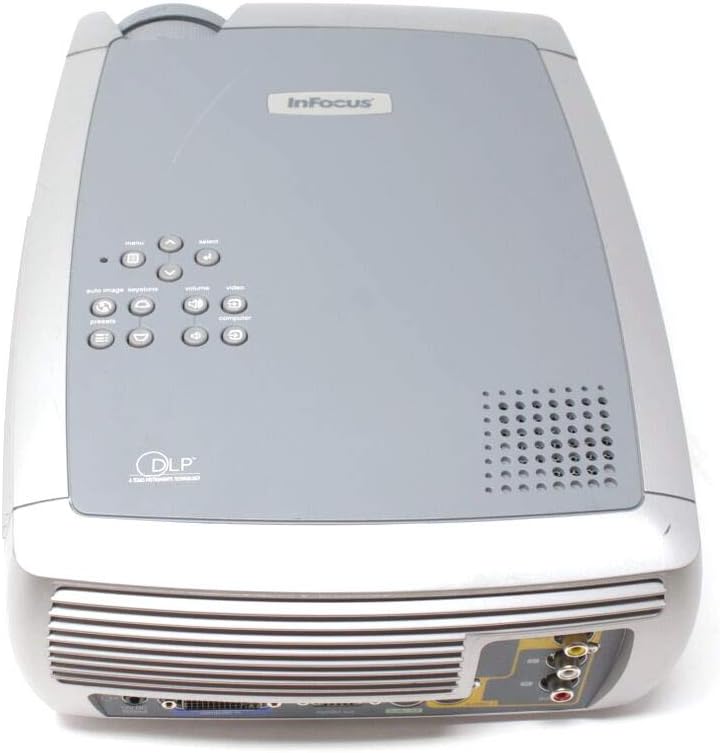
Figur 4.1: Øverst view of the InFocus X2 Projector, displaying the control panel with buttons for menu navigation, input selection, and image adjustments.
4.2 Billedjustering
- Fokus: Drej fokusringen på projektorlinsen, indtil billedet er skarpt og klart.
- Zoom: Juster zoomringen på projektorlinsen for at ændre billedstørrelsen.
- Keystone-korrektion: Use the keystone correction function (accessible via the menu) to square the image if the projector is not perfectly perpendicular to the screen.
4.3 Indgangsvalg
Use the 'Input' button on the control panel or remote control to cycle through available input sources (Computer, S-Video, Composite Video).
4.4 Brug af fjernbetjeningen
The included wireless Navigator remote control provides full functionality for operating the projector from a distance. Refer to the remote control's specific instructions for detailed button functions.
5. Vedligeholdelse
5.1 Lamp Udskiftning
Projektoren lamp has an estimated life of up to 3,000 hours in low-power mode. When the lamp needs replacement, a warning indicator will appear. Always allow the projector to cool down for at least 30 minutes before attempting to open the lamp door or replace the lamp.

Figur 5.1: Nederst view of the InFocus X2 Projector, showing the warning labels and the location of the lamp access panel. Refer to this area for lamp udskiftningsprocedurer.
WARNING: To replace the lamp, allow 30 minutes before opening the lamp door. Refer to instructions in the User's Guide to replace the lamp.
5.2 Rengøring
- Linse: Use a soft, lint-free cloth and a lens cleaning solution specifically designed for optical surfaces.
- Ydre: Tør projektorens yderside af med en blød, tør klud.amp klæde. Brug ikke slibende rengøringsmidler eller opløsningsmidler.
- Luftventiler: Ensure air vents are clear of dust and obstructions to prevent overheating. Use compressed air to gently clean the vents if necessary.
6. Fejlfinding
If you encounter issues with your InFocus X2 projector, refer to the following common problems and solutions:
| Problem | Mulig årsag | Løsning |
|---|---|---|
| Intet billede på skærmen | Incorrect input selected; loose cable connection; projector not powered on. | Verify input source; check all cable connections; ensure projector is powered on. |
| Billedet er sløret | Objektivet er ude af fokus. | Juster fokusringen på projektorlinsen. |
| Billedet er trapezformet | Projektoren er ikke vinkelret på skærmen. | Use keystone correction feature in the projector menu. |
| Projektoren overopheder og slukker | Blocked air vents; excessive ambient temperature. | Clear air vents; ensure proper ventilation; operate in a cooler environment. |
| Ingen lyd | Audio cables not connected; volume too low; incorrect audio input selected. | Connect audio cables; increase volume; select correct audio input. |
Hvis problemet fortsætter efter at have forsøgt disse løsninger, bedes du kontakte kundesupport.
7. Specifikationer
| Feature | Specifikation |
|---|---|
| Displayteknologi | DLP (Digital Light Processing) |
| Indfødt opløsning | 800 x 600 (SVGA) |
| Lysstyrke | 1500 ANSI Lumen (maks.) |
| Kontrastforhold | 2000:1 |
| Lamp Liv | Up to 3,000 hours (low power mode) |
| Aspektforhold | 4:3 (Native) |
| Billedstørrelse (diagonal) | 31" til 258" |
| Projiceringsmetoder | For, Bag, Loft |
| Indbygget højttaler | 2.5-watt mono |
| Indgange | M1-DA (Computer RGB, DVI, HDTV), S-Video, Composite Video, Stereo RCA Audio |
| Produktdimensioner | 12.87 x 9.8 x 4.17 tommer |
| Varens vægt | 12.39 pund |
8. Hvad er der i æsken
The InFocus X2 Multimedia DLP Projector package typically includes:
- InFocus X2 Projector
- Lens Cap
- Wireless Navigator Remote Control (with batteries)
- Computer kabel
- RCA Video and Audio Cable
- Strømledning
- Projector System CD (with multi-language user guide)
- Quick Start-kort
- Trykt brugervejledning
9. Garanti og support
For warranty information and technical support, please refer to the documentation included with your product or visit the official InFocus webwebsted. Behold din købskvittering som købsbevis i tilfælde af garantikrav.