
Indledning
This manual provides detailed instructions for the setup, operation, maintenance, and troubleshooting of your Panasonic DMR-E55S Progressive Scan DVD Recorder / Player. This unit allows for recording, editing, and storage on DVD-RAM and DVD-R discs, as well as playback of DVD, CD, CD-R, and MP3-on-CD formats. It features progressive scan video output for enhanced picture quality.
Opsætning
1. Udpakning og komponentkontrol
Fjern forsigtigt alle komponenter fra emballagen. Sørg for, at følgende dele er til stede:
- Panasonic DMR-E55S DVD Recorder / Player unit
- Fjernbetjening
- Strømledning
- Audio/Video Cables (may vary by region)
Retain all packaging materials for future transport or service needs.
2. Tilslutning til dit fjernsyn
The DMR-E55S offers multiple connection options for video and audio output. Choose the best option supported by your television for optimal quality.

Figur 1: Forside view of the Panasonic DMR-E55S unit. This image shows the disc tray, display panel, and front controls.
- Component Video Output (Y, Pb, Pr): For the highest quality analog video connection, connect component video cables (green, blue, red) from the DMR-E55S to your TV's component video input.
- S-videoudgang: Connect an S-video cable for improved video quality over composite video.
- Kompositvideoudgang (gul RCA): Connect a composite video cable for standard video quality.
- Audio Output (Red/White RCA): Connect red and white RCA cables from the DMR-E55S to your TV's audio input or an audio receiver.
- Optisk digital lydudgang: For digital surround sound, connect an optical cable to a compatible audio receiver.
- RF Coaxial Output: Connect a coaxial cable from the RF OUT jack on the DMR-E55S to your TV's antenna/cable input.

Figure 2: Rear panel of the Panasonic DMR-E55S, illustrating the various audio and video input/output ports for connection to a television or audio system.
3. Strømtilslutning
Connect the power cord to the AC IN terminal on the rear of the unit, then plug the other end into a standard electrical outlet.
4. Første opstart og grundlæggende indstillinger
Press the power button on the unit or remote control. Follow any on-screen prompts for initial setup, such as language selection and automatic channel search if using the RF input.
Betjeningsvejledning
1. Diskafspilning
The DMR-E55S supports playback of DVD-Video, DVD-R, DVD-RAM, CD, CD-R/RW, and MP3-on-CD discs.
- Tryk på OPEN/CLOSE-knappen for at åbne diskskuffen.
- Place a disc on the tray with the label side facing up.
- Press OPEN/CLOSE again to close the tray. Playback will usually begin automatically.
- Use the remote control for playback functions such as Play, Pause, Stop, Fast Forward, and Rewind.

Figure 3: Front panel of the DMR-E55S during operation, showing the illuminated display with disc information.
2. Recording to DVD-RAM and DVD-R
The unit supports recording to both DVD-RAM and DVD-R discs. DVD-RAM discs allow for repeated recording and editing, while DVD-R discs are suitable for permanent recordings.
- Insert a Recordable Disc: Place a blank DVD-RAM or DVD-R disc into the disc tray.
- Vælg inputkilde: Use the INPUT SELECT button on the remote or front panel to choose the desired input source (e.g., Line 1, Line 2, Tuner).
- One-Touch-optagelse: Press the RECORD button to start recording immediately. Press it again to stop.
- Optagetilstande: The unit offers 4-mode recording (XP/SP/LP/EP) and Flexible Recording (FR) to optimize recording quality and duration based on available disc space.
- Timeroptagelse: Access the timer recording menu to schedule recordings at specific times and channels.
- Finalizing DVD-R Discs: After recording to a DVD-R disc, it must be finalized through the menu system to be playable on other DVD players. DVD-RAM discs do not require finalization.
3. Time Slip Features
The DMR-E55S includes Time Slip functions, primarily for DVD-RAM discs:
- Chasing Playback: Begin watching a program from the beginning while it is still being recorded.
- Playlist Playback: Create custom playlists from recorded content on DVD-RAM discs.
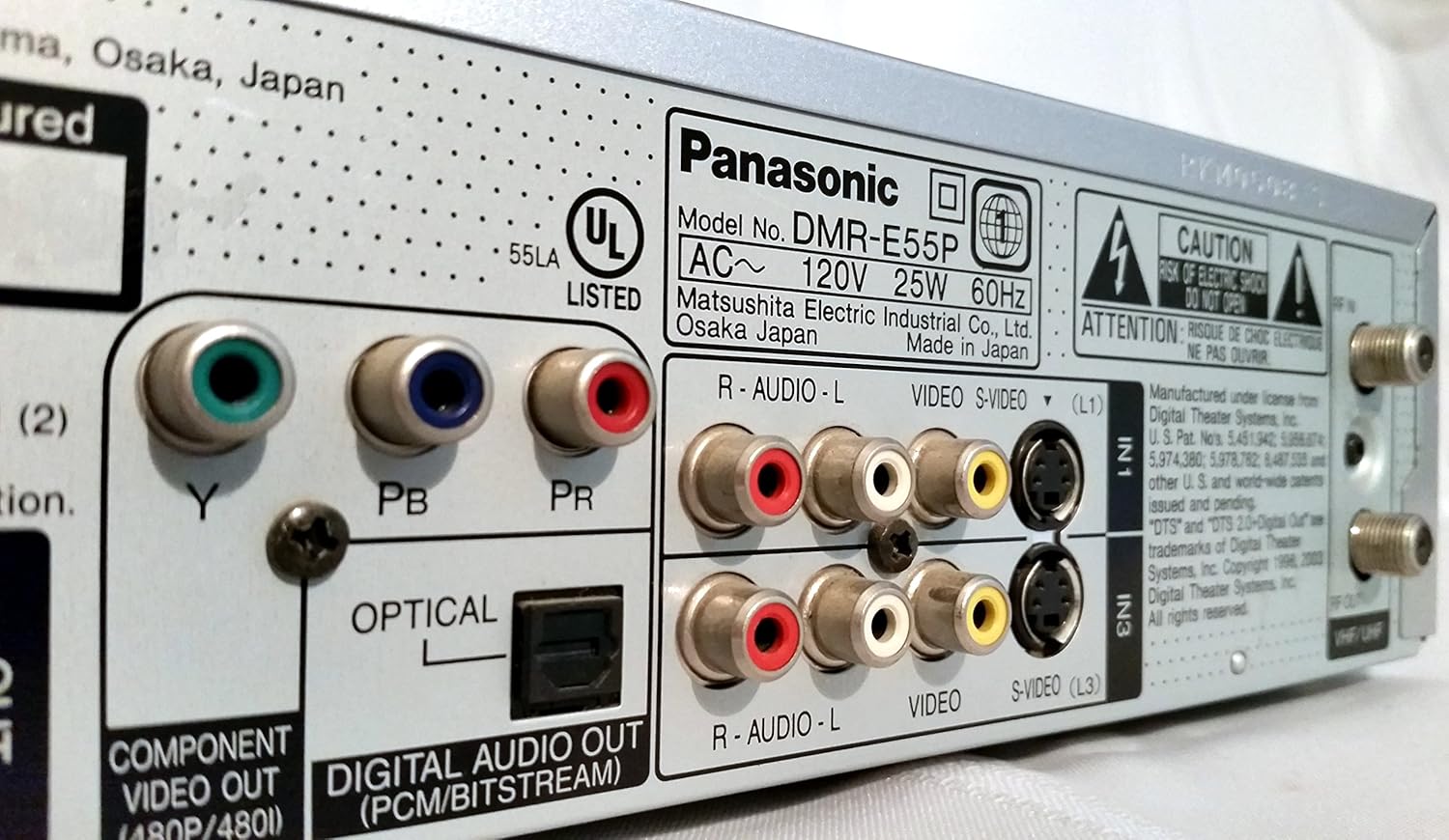
Figure 4: The remote control for the DMR-E55S, showing various buttons for playback, recording, and menu navigation.
Opretholdelse
1. Rengøring af enheden
Wipe the exterior of the unit with a soft, dry cloth. Do not use liquid or aerosol cleaners, as they may damage the finish or internal components.
2. Diskuspleje
Hold diskene i kanterne for at undgå fingeraftryk og ridser. Opbevar diskene i deres æsker, når de ikke er i brug. Rengør snavsede diske med en blød, fnugfri klud, og tør dem af fra midten og udad.
Fejlfinding
If you encounter issues with your DMR-E55S, refer to the following common problems and solutions:
| Problem | Mulig årsag/løsning |
|---|---|
| Ingen strøm | Ensure the power cord is securely connected to both the unit and a working electrical outlet. |
| Intet billede eller lyd | Verify all audio and video cables are correctly connected between the DMR-E55S and your TV/audio system. Check that your TV is set to the correct input source. |
| Disken afspilles ikke | Check if the disc is inserted correctly (label side up). Ensure the disc type is supported by the unit. Clean the disc if it is dirty or scratched. |
| Kan ikke optage | Ensure a recordable DVD-RAM or DVD-R disc is inserted. Check if the disc has sufficient free space. Verify the input source is correctly selected. |
| Recorded DVD-R disc won't play on other players | The DVD-R disc may not have been finalized. Finalize the disc through the unit's menu system. |
| Fjernbetjening virker ikke | Check the batteries in the remote control and replace them if necessary. Ensure there are no obstructions between the remote and the unit's IR sensor. |
Specifikationer
| Feature | Beskrivelse |
|---|---|
| Mærke | Panasonic |
| Modelnavn | DMR-E55S |
| Medietype | CD, DVD (DVD-RAM, DVD-R, DVD-Video, CD-R/RW, MP3-on-CD) |
| Speciel funktion | Progressiv scanning |
| Opløsning | 720 x 480 pixels |
| Video Output Resolution | 480p |
| Connector Type | RF, A/V (Composite), S-video, Component Video (Y, Pb, Pr), Optical Digital Audio |
| Lydudgangstilstand | Surround (Dolby Digital, DTS compatible via optical output) |
| Understøttet lydformat | DVD-Audio (2-channel), DVD-Video with surround play, MP3 |
| Videokodning | MPEG-2 (Hybrid Variable Bit Rate) |
| Analog Video Format | NTSC |
| Optagelsestilstande | XP, SP, LP, EP, FR (Flexible Recording) |
| Dimensioner (B x H x D) | 16.9 cm x 3.13 cm x 11.2 cm |
| Varens vægt | 8.58 pund |
| Inkluderet tilbehør | Fjernbetjening |
Garantioplysninger
This Panasonic DMR-E55S unit comes with a one-year warranty covering parts and labor from the date of purchase. Please retain your proof of purchase for warranty claims. For detailed terms and conditions, refer to the warranty card included with your product or contact Panasonic customer support.
Støtte
For further assistance, technical support, or service inquiries, please contact Panasonic customer support. You can find contact information on the Panasonic official webwebstedet eller i den dokumentation, der følger med dit produkt.