
Indledning
This manual provides essential instructions for the safe and efficient use of your Olympus Note Corder 100 digital voice recorder. Please read this manual thoroughly before operating the device and retain it for future reference.
Produkt overview
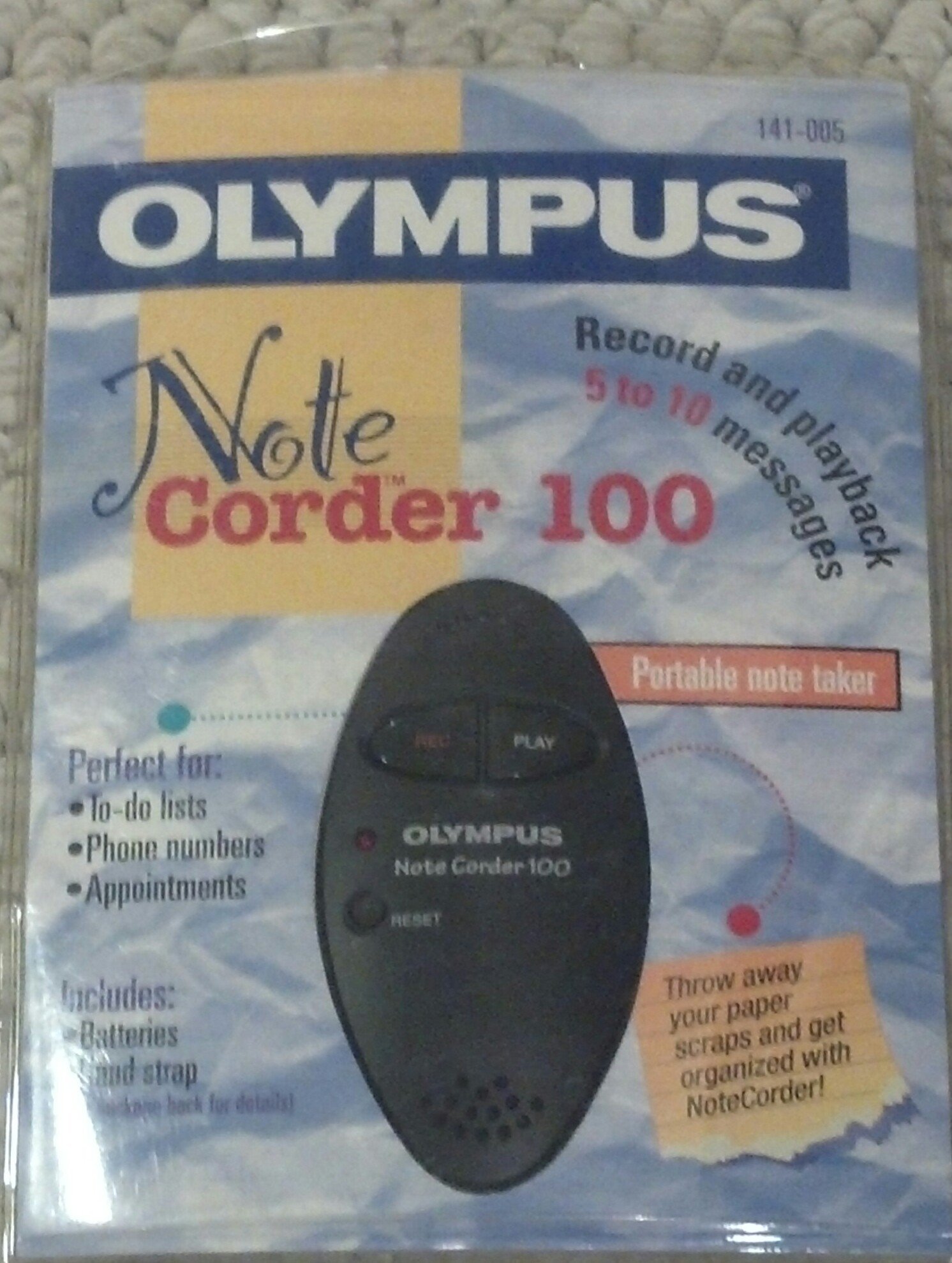
Image: The Olympus Note Corder 100 digital voice recorder, packaged. This image illustrates the product's compact design and highlights its primary features such as ergonomic design, 20-second recording time, and an LED indicator.
The Olympus Note Corder 100 is a compact, portable digital voice recorder designed for quick and convenient voice memos. Its ergonomic design ensures comfortable handling, making it ideal for recording short notes on the go.
Nøglefunktioner:
- Ergonomisk design: Fits comfortably in the palm of your hand.
- 20-Second Recording Time: Ideal for short, concise messages.
- LED-indikator: Giver visuel feedback om enhedens status.
- Indbygget hukommelse: Stores recordings internally.
- Portable Format: Nem at bære og bruge overalt.
Opsætning
1. Batteriinstallation
The Note Corder 100 requires two (2) CR2032 1.5V batteries for operation. Ensure correct polarity when inserting the batteries.
- Find batteridækslet på enheden.
- Open the cover by sliding or lifting it according to the markings.
- Insert two CR2032 batteries, observing the positive (+) and negative (-) terminals.
- Luk batterirummets dæksel forsvarligt.
2. Fastgørelse af håndremmen
Attach the included hand strap to prevent accidental drops and for convenient carrying.
- Locate the strap attachment point on the device.
- Thread the thin loop of the hand strap through the attachment point.
- Pass the main strap through the loop and pull firmly to secure it.
Betjeningsvejledning
1. Recording Messages
The Note Corder 100 allows for quick voice recordings up to 20 seconds in length.
- Tryk og hold på Optage button. The LED indicator will illuminate.
- Tal tydeligt ind i den indbyggede mikrofon.
- Slip Optage button to stop recording. The LED indicator will turn off.
- If the recording exceeds 20 seconds, the device will automatically stop recording.
2. Playing Back Messages
To listen to your recorded messages:
- Tryk på Spil button. The device will play back the last recorded message.
- Tryk på for at stoppe afspilningen Spil knappen igen.
3. LED-indikator
The LED indicator provides visual cues for the device's status:
- Illuminated during Record: Angiver aktiv optagelse.
- Slukket: Indicates standby or stopped recording/playback.
Opretholdelse
1. Udskiftning af batteri
Replace batteries when the device's performance degrades or the LED indicator suggests low power.
- Følg trinene til batteriinstallation, der er beskrevet i afsnittet Opsætning.
- Always use two new CR2032 1.5V batteries.
- Bortskaf gamle batterier ansvarligt i henhold til lokale regler.
2. Rensning
Keep your Note Corder 100 clean to ensure optimal performance.
- Tør enhedens yderside af med en blød, tør klud.
- Brug ikke flydende rengøringsmidler, opløsningsmidler eller slibende materialer.
- Undgå at fugt kommer ind i åbninger.
Fejlfinding
| Problem | Mulig årsag | Løsning |
|---|---|---|
| Enheden tænder ikke. | Batterierne er opbrugt eller isat forkert. | Udskift batterierne med nye CR2032-celler, og sørg for at polariteten vender korrekt. |
| Cannot record messages. | Record button not held down, or batteries are low. | Ensure the Record button is pressed and held during recording. Check and replace batteries if necessary. |
| Ingen lyd under afspilning. | No message recorded, or low battery. | Verify a message has been recorded. Replace batteries. |
Specifikationer
- Model: Olympus Note Corder 100 (Model No. 141-005)
- Optagelsestid: Up to 20 seconds per message
- Strømkilde: 2 x CR2032 1.5V Lithium Batteries
- Hukommelse: Built-in (non-expandable)
- Mikrofon: Integreret
- PC-forbindelse: Ikke understøttet
- Stemmeaktivering: Ikke understøttet
- Year of Introduction: 1996
Garanti og support
The Olympus Note Corder 100 comes with a 90 dages begrænset garanti fra købsdatoen. Denne garanti dækker fabrikationsfejl ved normal brug.
For warranty claims or technical support, please contact Olympus America Inc. at the address below. Please have your proof of purchase and product model number ready.
Olympus America Inc.Two Corporate Center Drive
Melville, NY 11747-3157 USA
Note: This product was manufactured in China.