
1. Introduktion
Tak for købetasing the JVC RX-5000R AV Receiver. This manual provides detailed instructions for the proper setup, operation, and maintenance of your receiver. Please read this manual thoroughly before using the unit to ensure optimal performance and safety.
The JVC RX-5000R is an advanced audio/video receiver designed to deliver high-quality sound for your home entertainment system. It features Dolby Surround Pro Logic compatibility, providing 100 watts of output power per channel across five channels. With its 5 separate power amplivligere stages and 5.1-channel analog input, it supports multi-channel audio formats like Dolby Digital. The integrated RDS tuner allows for convenient radio listening with memory for up to 30 FM and 15 MW/LW stations. The receiver also includes a subwoofer output and 5 audio inputs for connecting various devices. A remote control is included for ease of use.
2. Vigtige sikkerhedsoplysninger
Always follow these basic safety precautions when using your JVC RX-5000R AV Receiver to reduce the risk of fire, electric shock, and injury:
- Strømkilde: Tilslut kun enheden til en stikkontakt med vekselstrøm.tage angivet på bagpanelet.
- Ventilation: Sørg for tilstrækkelig ventilation. Bloker ikke ventilationsåbningerne. Sørg for tilstrækkelig plads omkring enheden til korrekt luftgennemstrømning.
- Vand og fugt: Udsæt ikke enheden for regn eller fugt. Placer ikke genstande fyldt med væsker, såsom vaser, på enheden.
- Varme: Hold enheden væk fra varmekilder såsom radiatorer, varmeapparater, komfurer eller andre apparater (herunder ampløftere), der producerer varme.
- Rensning: Tag stikket ud af stikkontakten før rengøring. Brug en tør klud til rengøring.
- Service: Forsøg ikke selv at servicere dette produkt. Overlad al service til kvalificeret servicepersonale.
- Lyn: Tag stikket ud af enheden under tordenvejr, eller når den ikke skal bruges i længere perioder.
3. Opsætning og forbindelser
This section guides you through connecting your JVC RX-5000R AV Receiver to your speakers, audio sources, and power supply.
3.1 Udpakning
Carefully remove the receiver and all accessories from the packaging. Verify that all components are present:
- JVC RX-5000R AV Receiver
- Fjernbetjening
- FM antenne
- AM-løkkeantenne
- Strømledning
- Instruktionsmanual (dette dokument)
3.2 Højttalerforbindelser
The RX-5000R supports a 5.1 channel speaker configuration. Connect your speakers as follows:
- Front Speakers (Left/Right): Tilslut til de forreste L/R-terminaler.
- Center højttaler: Tilslut til CENTER-terminalen.
- Surround Speakers (Left/Right): Tilslut til SURROUND L/R-terminalerne.
- subwoofer: Connect an active subwoofer to the SUBWOOFER PRE OUT jack.
Note: Ensure correct polarity (+ to + and - to -) for all speaker connections to prevent phase issues and ensure optimal sound quality.
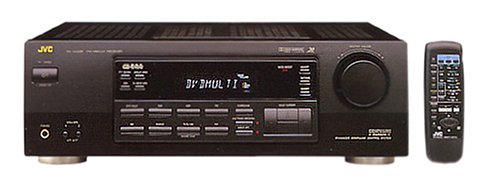
Figure 1: Rear panel of the JVC RX-5000R showing speaker and audio input terminals. This image illustrates the various connection points for speakers and external audio devices.
3.3 Lydkildetilslutninger
Connect your audio components (CD player, DVD player, TV, etc.) to the appropriate audio input jacks on the rear panel.
- Analoge lydindgange: The receiver features 5 analog audio inputs. Use RCA cables to connect your devices to these inputs (e.g., CD, TAPE, VCR, DVD, TV).
- Digitale lydindgange: The receiver supports Optical and Coaxial digital audio inputs. Connect compatible devices (e.g., DVD player, game console) to these inputs for high-quality digital sound.
- 5.1 Channel Analog Input: For devices with multi-channel analog outputs (e.g., older DVD players with built-in Dolby Digital/DTS decoders), connect to the 5.1 CH INPUT jacks.
3.4 Antenneforbindelser
Tilslut de medfølgende FM- og AM-antenner til radiomodtagelse.
- FM-antenne: Connect the FM wire antenna to the FM 75Ω COAXIAL terminal. Extend the wire for best reception.
- AM-antenne: Assemble the AM loop antenna and connect its wires to the AM terminals. Position the antenna for optimal reception.
3.5 Strømtilslutning
After all audio and speaker connections are made, connect the power cord to the AC inlet on the receiver and then to a wall outlet.
4. Grundlæggende betjening
This section covers the fundamental operations of your JVC RX-5000R AV Receiver.
4.1 Tænd/sluk
Tryk på MAGT button on the front panel or the remote control to turn the receiver on or off.
4.2 Indgangsvalg
Brug INPUTVÆLGER knob on the front panel or the corresponding input buttons (e.g., CD, DVD, TV/VCR) on the remote control to select your desired audio source.
4.3 Lydstyrkekontrol
Juster mastervolumen med den store BIND knappen på frontpanelet eller LYDSTYRKE +/- knapperne på fjernbetjeningen.
4.4 Sound Mode Selection
The RX-5000R offers various sound modes, including Dolby Surround Pro Logic. Press the LYDTILSTAND button on the remote control or front panel to cycle through available modes and select the one best suited for your content.
4.5 Tuner Operation (RDS)
Sådan lytter du til radio:
- Vælg TUNER input.
- Trykke BAND to select FM or AM.
- Brug TUNING +/- buttons to manually tune to a station or AUTO TUNE to scan for stations.
- To store a station, press HUKOMMELSE, og brug derefter FORUDINDSTILLING +/- knapperne for at vælge et forudindstillet nummer, og tryk på HUKOMMELSE again to confirm. The receiver supports up to 30 FM and 15 MW/LW presets.
- De RDS (Radio Data System) feature, if available on the broadcast, will display station information such as program type or station name.
5. Vedligeholdelse
Proper care and maintenance will ensure the longevity and optimal performance of your JVC RX-5000R AV Receiver.
- Rengøring af enheden: Disconnect the power cord before cleaning. Use a soft, dry cloth to wipe the exterior surfaces. Do not use abrasive cleaners, waxes, or solvents as they may damage the finish.
- Ventilation: Regularly check that the ventilation openings are not obstructed by dust or debris. Blocked vents can lead to overheating.
- Strømledning: Inspect the power cord periodically for any signs of damage. If damaged, contact qualified service personnel for replacement.
- Opbevaring: Hvis enheden skal opbevares i længere tid, skal den tages ud af stikkontakten og opbevares et køligt, tørt sted væk fra direkte sollys og ekstreme temperaturer.
6. Fejlfinding
Before contacting service personnel, please refer to the following table for common issues and their solutions.
| Problem | Mulig årsag | Løsning |
|---|---|---|
| Ingen strøm | Netledningen er ikke tilsluttet korrekt. Strømudtaget er ikke aktivt. | Ensure the power cord is firmly plugged into the receiver and the wall outlet. Test stikkontakten med en anden enhed. |
| Ingen lyd | Forkert input valgt. Speaker wires are loose or incorrectly connected. Lydstyrken er for lav eller slået fra. Source device is not playing or has low volume. | Vælg den korrekte inputkilde. Kontroller alle højttalertilslutninger for korrekt polaritet og sikker montering. Increase volume and check if MUTE is active. Ensure the source device is playing and its volume is adequate. |
| Dårlig radiomodtagelse | Antennen er ikke korrekt tilsluttet eller placeret. Interferens fra andre elektroniske enheder. | Adjust the position and orientation of the FM and AM antennas. Move the receiver or antennas away from other electronic devices. |
| Fjernbetjening virker ikke | Batterierne er opbrugt eller isat forkert. Blokering mellem fjernbetjening og modtager. | Udskift batterierne med nye, og sørg for korrekt polaritet. Remove any obstacles and ensure the remote is pointed at the receiver's sensor. |
7. Specifikationer
Disse specifikationer kan ændres uden varsel.
- Model: JVC RX-5000R
- Udgangseffekt: 100 watt pr. kanal (5 kanaler)
- Lydkanaler: 5.1 Surround Sound
- Surround Sound konfiguration: 5.1
- Lydudgangstilstand: Omgive
- Forbindelse teknologi: Optical, Coaxial, 3.5 mm jack (for audio inputs)
- Lydindgange: 5 Analog Audio Inputs, 5.1 Channel Analog Input, Digital Optical, Digital Coaxial
- Tuner: RDS (Radio Data System) compatible FM/AM tuner
- Tuner forudindstillinger: 30 FM, 15 MW/LW
- Kontroltype: Push button, Remote control
- Kompatible enheder: Television, CD players, DVD players, etc.
- Fabrikant: JVC
Note: The listed "Aantal HDMI-poorten: 5" in some product data refers to general input count and not necessarily HDMI video ports for this model. This receiver primarily handles audio and older video signals via analog connections.
8. Garanti og kundesupport
JVC products are manufactured to the highest quality standards. For warranty information, please refer to the separate warranty card included with your product or visit the official JVC webwebsted for din region.
For technical assistance, troubleshooting beyond this manual, or service inquiries, please contact JVC customer support. Contact details can typically be found on the official JVC webwebstedet eller i din produkts emballage.
When contacting support, please have your model number (RX-5000R) and serial number ready.