
Indledning
The Vivitar 450PZ is a compact 35mm camera designed for ease of use, featuring fully automatic operation. This manual provides essential information for setting up, operating, maintaining, and troubleshooting your camera to ensure optimal performance.
The camera incorporates automatic focusing and exposure, a 38 to 70mm zoom lens, an automatic flash with red-eye reduction, and motorized film handling. An electronic self-timer is also included for convenience.
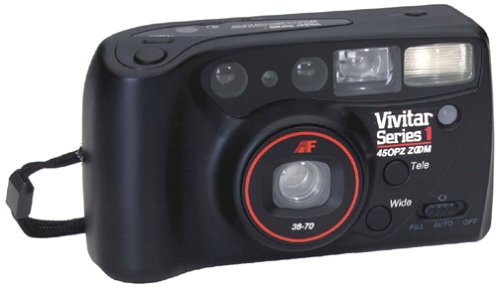
Billede: Forside view of the Vivitar 450PZ 35mm Camera, showcasing dens kompakte design og objektiv.
Opsætning
1. Batteriinstallation
- Locate the battery compartment cover on the camera body.
- Open the cover by sliding or lifting it according to the indicator.
- Insert the required CR123A type batteries, ensuring correct polarity (+/-) as indicated inside the compartment.
- Luk batterirummets dæksel forsvarligt.
2. Filmindlæsning
- Åbn kameraets bagside ved at skubbe låsen.
- Placer en 35 mm filmpatron i filmkammeret.
- Pull the film leader across to the film take-up spool, aligning it with the start mark.
- Luk kameraet tilbage. Kameraet vil automatisk fremføre filmen til det første billede.
3. Wrist Strap Attachment
Attach the provided wrist strap to the designated loop on the camera body. This helps prevent accidental drops and provides a secure grip during use.
Betjening af kameraet
1. Tænd/sluk
Locate the power button or switch, typically near the shutter button. Press or slide it to turn the camera on or off.
2. Optagelse af billeder
- Kig igennem viewfinderen til at komponere dit billede.
- Press the shutter button halfway down to activate the autofocus and exposure systems. The camera will automatically set the focus and exposure.
- Press the shutter button fully down to take the picture. The film will automatically advance to the next frame.
3. Zoomfunktion
Use the zoom control (usually a lever or buttons near the shutter) to adjust the focal length between 38mm (wide-angle) and 70mm (telephoto). This allows you to bring subjects closer or capture a wider scene.
4. Blitzfunktion
- Automatisk blitz: The flash will automatically fire in dimly lit conditions to ensure proper exposure.
- Rødøjereduktion: When activated, the camera emits a series of pre-flashes before the main flash to reduce the red-eye effect in portraits.
- Flash Off Mode: For situations where flash is not desired (e.g., museums, theater), locate the flash mode button and select the 'flash off' setting.
5. Selvudløser
To use the self-timer, press the self-timer button. A flashing LED indicator will typically signal the countdown. After a set delay (e.g., 10 seconds), the camera will automatically take the picture, allowing the photographer to be included in the shot.
6. Film Rewind
When the film roll is complete, the camera will automatically rewind the film back into the cartridge. A mid-roll rewind function may also be available, allowing you to rewind the film before the roll is finished by pressing a specific button (refer to camera markings if available).
Opretholdelse
Rengøring af kameraet
- Brug en blød, fnugfri klud til forsigtigt at tørre kamerahuset af.
- Brug en specialklud og en rengøringsopløsning til linsen. Undgå at berøre linsens overflade med fingrene.
- Do not use abrasive cleaners or solvents, as these can damage the camera's finish and optical components.
Opbevaring
- Når kameraet ikke er i brug, skal det opbevares et køligt og tørt sted, væk fra direkte sollys og ekstreme temperaturer.
- Fjern batterierne, hvis kameraet ikke skal bruges i længere tid, for at forhindre lækage.
Fejlfinding
Kamera tænder ikke
- Kontroller, om batterierne er isat korrekt med den rigtige polaritet.
- Udskift gamle eller afladede batterier med nye.
- Sørg for, at tænd/sluk-knappen er i 'Tændt'-positionen.
Film Not Advancing
- Verify that the film is correctly loaded and the leader is engaged with the take-up spool.
- Check if the film door is securely closed.
- Ensure there is enough power from the batteries for the motor to operate.
Flash Not Firing
- Confirm that the flash is not set to 'Flash Off' mode.
- Allow sufficient time for the flash to charge (indicated by a flash ready lamp).
- Ensure ambient light conditions are dark enough for the automatic flash to activate.
Specifikationer
| Feature | Detalje |
|---|---|
| Mærke | Vivitar |
| Modelnavn | 450PZ |
| Filmformattype | 35 mm |
| Linse | 38-70mm Zoom |
| Eksponeringskontrol | Automatisk |
| Fokus System | 14-zone Autofocus |
| Blitz | Automatic with Red-Eye Reduction |
| Filmhåndtering | Motorized Loading, Advance, and Rewind |
| Særlige funktioner | Built-In Flash, Compact Design, Electronic Self-Timer |
| Varens vægt | 15.2 ounce |
| Inkluderede komponenter | Kamerahus og objektiv |
Garanti og support
Garantioplysninger
The Vivitar 450PZ camera comes with a warranty covering one year on parts and 90 days on labor from the date of purchase. Please retain your proof of purchase for warranty claims.
Kundesupport
For technical assistance, service, or further inquiries regarding your Vivitar 450PZ camera, please refer to the contact information provided with your product packaging or visit the official Vivitar webwebsted for supportressourcer.