
Indledning
Welcome to your Nikon Nice Touch Zoom QD Date 35mm Camera. This manual provides essential instructions for the proper setup, operation, and maintenance of your camera to ensure optimal performance and longevity.
Kamerakomponenter
Familiarize yourself with the main parts of your camera for effective use.

Figur 1: Forside view of the Nikon Nice Touch Zoom QD Date 35mm Camera, showing the lens and flash unit.
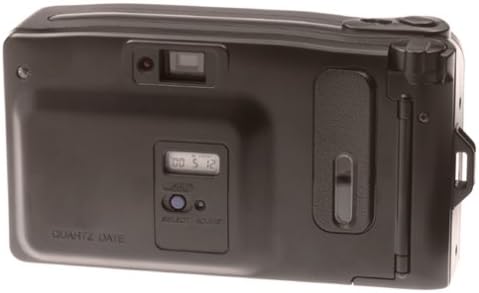
Figur 2: Bagside view of the Nikon Nice Touch Zoom QD Date 35mm Camera, highlighting the viewfinder, Quartz Date display, and control buttons.
Nøglefunktioner
- Automatic flash for various lighting conditions.
- 29mm wide-angle lens for broader scene capture.
- Red-eye reduction feature to improve portrait photos.
- Quartz Date (QD) function for imprinting date and time on photos.
Opsætning
1. Batteriinstallation
The camera requires a rechargeable battery for operation.
- Locate the battery compartment cover, typically on the bottom or side of the camera.
- Open the cover by sliding or lifting it.
- Isæt batteriet i henhold til polaritetsindikatorerne (+/-) inde i batterirummet.
- Luk batterirummets dæksel forsvarligt.
2. Ilægning af film
- Åbn kameraets bagside.
- Placer filmpatronen i filmkammeret.
- Pull the film leader across to the film take-up spool.
- Sørg for, at filmens perforeringer griber ind i tandhjulene.
- Close the camera back cover. The camera will automatically advance the film to the first frame.
3. Setting the Quartz Date (QD Models Only)
For models with the Quartz Date function, you can set the date and time to be imprinted on your photos.
- Locate the QD display and control buttons on the camera back (refer to Figure 2).
- Brug VÆLGE button to cycle through date/time display modes (Year, Month, Day, Hour, Minute).
- Brug TILPASSE knappen for at ændre den valgte værdi.
- Once set, the date will be imprinted on your photos.
Betjening af kameraet
1. Tænd/sluk
To turn the camera on, slide the power switch or press the power button. To turn it off, repeat the action.
2. At tage et billede
- Kig igennem viewfinder til at indramme dit skud.
- Gently press the shutter button halfway down to activate the autofocus system. The focus indicator in the viewfinder will confirm focus.
- Tryk udløserknappen helt ned for at tage billedet.
3. Brug af zoomfunktionen
The camera features a zoom lens. Use the zoom lever or buttons, typically located near the shutter button, to zoom in (telephoto) or zoom out (wide-angle).
4. Blitztilstande
The camera has an automatic flash system.
- Automatisk blitz: The flash fires automatically in low-light conditions.
- Rødøjereduktion: This mode fires a pre-flash before the main flash to reduce the red-eye effect.
Consult the camera's flash mode button (if present) to cycle through available flash settings.
5. Unloading Film
Once all frames on the film roll have been exposed, the camera will automatically rewind the film into its cartridge.
- Wait for the camera to complete the automatic rewind process.
- Åbn kameraets bagside.
- Fjern filmpatronen.
- Close the camera back cover.
Opretholdelse
Rengøring af kameraet
- Brug en blød, fnugfri klud til at rengøre kamerahuset.
- For the lens, use a lens brush or a blower to remove dust, then gently wipe with a lens cleaning cloth and lens cleaning solution if necessary.
- Brug ikke organiske opløsningsmidler eller stærke kemikalier.
Opbevaring
Opbevar kameraet et køligt og tørt sted væk fra direkte sollys og ekstreme temperaturer. Fjern batterierne, hvis kameraet ikke skal bruges i længere tid.
Fejlfinding
| Problem | Løsning |
|---|---|
| Kameraet tænder ikke. | Kontroller batteriinstallationen, og sørg for, at batterierne er opladet eller udskiftet. |
| Filmen går ikke videre. | Ensure film is correctly loaded and the camera back is securely closed. |
| Blitzen går ikke ud. | Check if the flash is set to an appropriate mode for current lighting conditions. Ensure batteries have sufficient power. |
| Billederne er slørede. | Ensure the camera is held steady during exposure. Allow the autofocus to lock before fully pressing the shutter. |
Specifikationer
- Mærke: Nikon
- Model: Nice Touch Zoom QD
- Kameratype: Point & Shoot Film Camera
- Filmtype: 35 mm
- Linse: Zoom Lens (e.g., 29mm wide-angle)
- Blitz: Built-in, Automatic with Red-eye Reduction
- Fokus: Auto Focus (Contrast Detection)
- Eksponeringskontrol: Automatisk
- Date Imprint: Quartz Date (QD) function
- Strømkilde: Genopladeligt batteri (medfølger ikke)
- Formfaktor: Kompakt
Garantioplysninger
This Nikon product comes with a limited warranty.
- Dele: 1 år
- Arbejdskraft: 90 dage
For detailed warranty terms and conditions, please refer to the warranty card included with your product or visit the official Nikon webwebsted.
Kundesupport
For technical assistance, service, or further inquiries, please contact Nikon customer support.
Visit the official Nikon webwebsted for kontaktoplysninger og supportressourcer: Nikon support