
1. Introduktion
This manual provides essential information for the proper setup, operation, and maintenance of your GPX C3302RS Sports Cassette Player. Please read these instructions thoroughly before using the device to ensure optimal performance and longevity.
2. Opsætning
2.1 Udpakning
Carefully remove the cassette player from its packaging. Ensure all components are present. Retain the packaging for future transport or storage.
2.2 Power Source: Battery Installation
The GPX C3302RS requires two (2) AA batteries for operation. Follow these steps to install the batteries:
- Locate the battery compartment cover, typically on the back or side of the unit.
- Skub eller løft dækslet for at åbne rummet.
- Insert two fresh AA batteries, ensuring the positive (+) and negative (-) terminals align with the markings inside the compartment.
- Luk batterirummets dæksel forsvarligt.
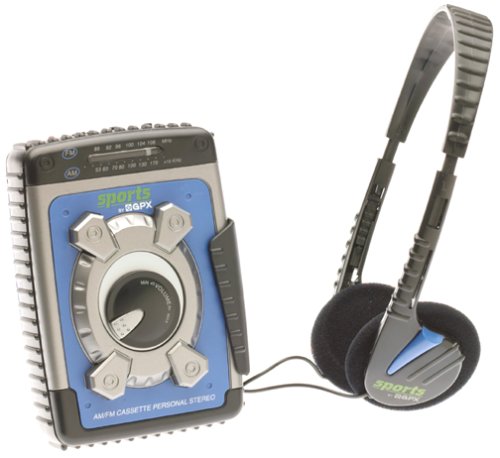
Image: The GPX C3302RS Sports Cassette Player with its cassette compartment open, revealing the internal mechanism. This view also indicates the general location for battery access, often adjacent to or within the main body of the player.
2.3 Tilslutning af hovedtelefoner
Locate the headphone jack, usually marked with a headphone symbol. Insert your 3.5mm stereo headphones firmly into this jack. Ensure the connection is secure for optimal audio output.
3. Betjeningsvejledning
3.1 Isætning af et kassettebånd
- Tryk på STOP/Skub ud knappen for at åbne kassetteskuffen.
- Insert a cassette tape with the exposed tape side facing upwards and the desired side (A or B) facing the playback head.
- Gently close the cassette compartment door until it clicks shut. Do not force the door.
3.2 Cassette Playback Controls
- SPIL (►): Press this button to start playing the cassette tape.
- STOP/UDKØB (■/▲): Press once to stop playback. Press again to open the cassette compartment.
- FAST FORWARD (FFWD ►►): Press and hold to rapidly advance the tape. Release to stop.
- REWIND (REW ◄◄): Press and hold to rapidly rewind the tape. Release to stop.
- PAUSE (▐▐): Press to temporarily stop playback without disengaging the tape. Press again to resume.
3.3 Lydstyrkekontrol
Drej på BIND dial, typically located on the side or front of the unit, to adjust the audio output level through your headphones.
3.4 AM/FM-radiobetjening
Your GPX C3302RS includes an integrated AM/FM radio tuner.
- Skub til FUNGERE skift til enten AM or FM.
- Drej på TUNING dial to scan for radio stations.
- Juster BIND til det ønskede lytteniveau.
- For optimal FM reception, extend the telescopic antenna. For AM reception, rotate the unit for best signal.
3.5 Bass Boost-funktion
Engager BASS BOOST switch (if present) to enhance low-frequency audio output for a richer sound experience.
4. Vedligeholdelse
4.1 Rengøring af enheden
- Ydre: Tør afspillerens yderside af med en blød, let fugtig klud.amp klæde. Brug ikke slibende rengøringsmidler eller opløsningsmidler.
- Båndhoveder: Periodically clean the tape heads, pinch roller, and capstan using a cotton swab lightly moistened with isopropyl alcohol. This helps maintain sound quality and prevents tape damage.
4.2 Batteripleje og udskiftning
- Replace batteries when the sound becomes distorted or the unit stops functioning.
- Udskift altid begge batterier med nye samtidig.
- Fjern batterierne, hvis enheden ikke skal bruges i længere tid, for at forhindre lækage og skader.
- Bortskaf brugte batterier ansvarligt i henhold til lokale regler.
4.3 Opbevaring
When not in use, store the cassette player in a cool, dry place away from direct sunlight, extreme temperatures, and excessive dust.
5. Fejlfinding
| Problem | Mulig årsag | Løsning |
|---|---|---|
| Ingen strøm | Døde eller forkert installerede batterier. | Udskift batterierne med nye, og sørg for at polariteten vender korrekt. |
| Ingen lyd | Headphones not connected properly; Volume too low; Dirty tape heads. | Ensure headphones are fully plugged in. Increase volume. Clean tape heads. |
| Båndet afspilles ikke/bevæger sig ikke | Tape jammed; PLAY button not fully engaged; Batteries low. | Check tape for damage. Press PLAY firmly. Replace batteries. |
| Dårlig radiomodtagelse | Antenna not extended (FM); Unit orientation (AM); Weak signal area. | Extend FM antenna. Rotate unit for AM. Try moving to a different location. |
6. Specifikationer
- Modelnummer: C3302RS
- Strømkilde: 2 x 'AA' size batteries (not included)
- Produktdimensioner: 4.2 x 2 x 5.1 tommer (ca.)
- Varens vægt: 1.6 ounce (uden batterier)
- Fabrikant: GPX
7. Garanti og support
For warranty information or technical support regarding your GPX C3302RS Sports Cassette Player, please refer to the warranty card included with your purchase or visit the official GPX webwebstedet. Behold din købskvittering som købsbevis.