

STRØM OG OPSÆTNING


SMART CONTROLLER (x1) SENSOR PROBE (x1)


CONTROLLER PLATE BOLTS (x2) HEX NUTS (X3)


WOOD SCREWS (WALL HANG) (X2) WIRE TIE (X1)
TRIN 1
Plug the sensor probe into the controller’s 3.mm jack. Set the probe near your plants in your grow tent for the most accurate reading.

TRIN 2
Plug your device’s UIS connector into one of the controller’s ports to connect and power the controller.

TRIN 3
Plug your UIS device’s power cord into an AC power outlet to power it.

You may use the included tie mounts and wire ties to manage the cords.
 OVERVIEW

a. CURRENT TIME
b. CURRENT LEVEL
c. COUNTDOWN
d. PROBE HUMIDITY
e. USER SETTING
f. ALERT ICONS
g. PROBE VPD
h. PROBE TEMP.
i. MODE
j. PORTS
1. Port Button – Cycles through all connected devices.
2. Mode-knap – Cycles through the controller’s programming modes.
3. Setting Button – Cycles through the controller settings.
4. Up/Down Buttons – Adjusts the parameters of the mode or setting you are in.
ENVIRONMENTAL GUIDE
Use either VPD or Temp/RH as a guide when programming your devices.
| Plante Stage | VPD | Temperatur | Relativ luftfugtighed | Lys Varighed |
| Spiring | 0.2-0.8 kPa | 70 ° -80 ° F (21 ° -27 ° C) | 70%-80% | 13+ Hours/Day |
| Frøplante | 0.6-1.1 kPa | 70 ° -80 ° F (21 ° -27 ° C) | 60%-70% | 13+ Hours/Day |
| Vegetativ | 0.6-1.4 kPa | 70 ° -80 ° F (21 ° -27 ° C) | 50%-70% | 13+ Hours/Day |
| Blomstrende | 0.8-1.8 kPa | 70 ° -80 ° F (21 ° -27 ° C) | 40%-60% | 12 Hours/Day |
Use the following steps to select the ideal programming for your device. Each port can run only one mode. Each mode’s functionality can be affected by certain controller settings.

- Select a PORT
ALLE 
1 2 3 4 - Select a MODE program for the port to run
OFF Mode / Min Level (pg. 4) ON Mode / Max Level (pg. 4) AUTO Mode (pg. 4) VPD Mode (pg. 5) TIMER TO ON Mode (pg. 5) TIMER TO OFF Mode (pg. 5) CYCLE Mode (pg. 6) SCHEDULE Mode (pg. 6) - Review PROGRAMMERING that may affect modes
Max/Min Level Setting (pg.4)
Affects ALL Modes - Review INDSTILLINGER that may affect modes
Transition Setting (pg.8)
Affects AUTO and VPD ModesBuffer Setting (pg.9)
Affects AUTO and VPD Modes - Return to resume programming
 MODES
MODES
OFF MODE (MIN LEVEL) / ON MODE (MAX LEVEL)
OFF-TILSTAND
INDSTIL TIL
3
MIN NIVEAU
Sets the minimum level your device will run at in all other modes.
NIVEAUER 
PÅ TILSTAND
INDSTIL TIL
6
MAKS NIVEAU
Sets the maximum level your device will run at in all other modes.
NIVEAUER 
AUTO-TILSTAND
All four triggers can activate and run simultaneously. Turn off any triggers not in use by holding down the up and down buttons together.
HIGH TEMP. TRIGGER FOR COOLING FANS
Activates your device if temperature levels meet or exceed your set figure.
HIGH TEMP. TRIGGER
HIGH HUMID. TRIGGER FOR DEHUMIDIFIERS
Activates your device if relative humidity levels meet or exceed your set figure.
HIGH HUMID. TRIGGER
LOW TEMP. TRIGGER FOR HEATERS
Activates your device if temperature levels meet or fall below your set figure.
LOW TEMP. TRIGGER
LOW HUMID. TRIGGER FOR HUMIDIFIERS
Activates your device if relative humidity levels meet or fall below your set figure.
LOW HUMID. TRIGGER
VPD MODE
Measures the ambient temperature, relative humidity, and your plant’s leaf temperature. Monitoring this will help you create the ideal evaporation rate for your plant to ensure a steady flow of nutrients from its roots to the rest of its anatomy. VPD Mode is specifically designed for grow applications.

HIGH VPD TRIGGER
Activates your device if VPD levels meet or exceed your set figure.
HIGH VPD TRIGGER
LOW VPD TRIGGER
Activates your device if VPD levels meet or fall below your set figure.
LOW VPD TRIGGER
TIMER TIL TILSTAND
Sets a timer that will turn on your device at the end of the countdown. This mode will not repeat automatically but must be reset.
TIMER TIL FRA
(Countdown End Point)
TIMER TIL FRA TILSTAND
Sets a timer that will turn off your device at the end of the countdown. This mode will not repeat automatically but must be reset.
TIMER TIL TIL
(Countdown End Point)
CYKLINGSTILSTAND
Sets an ON duration and an OFF duration for your device to cycle through continuously. Both ON and OFF countdown timers must be set in order for your device to properly cycle.
I dette example, the ON duration is set to 30 minutes and the OFF duration is set to 1 hour.
Your device will turn on for 30 minutes and turn off for 1 hour. It will then turn on for 30 minutes again before turning off for 1 hour. This cycle will continue until you leave this mode.

SCHEMA TILSTAND
Sets a daily schedule for your device to trigger on and off. Both ON and OFF clock times must be set in order for your device to be properly scheduled. The controller clock time must also be set under Settings in order for your device to properly follow schedules.
I dette example, the ON time is set to 9 AM and the OFF time is set to 7 PM. This will trigger your device to run between 9 AM to 7 PM on a daily basis while you remain in this mode.

 INDSTILLING
SKÆRMINDSTILLING
Adjusts display brightness and auto-dimming. Cycle through levels 1, 2, 3, A2 and A3. A2 and AS set the brightness level at 2 and 3, respectively, dimming to level 1 after 15 seconds of inactivity.

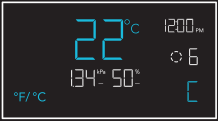
°F/°C INDSTILLING
Changes the displayed units to Fahrenheit or Celsius. All displayed units automatically convert when adjusting this setting.
URINDSTILLING
Adjusts the current clock time. Cycling through 12:00 will automatically change the units to AM or PM.

KALIBRERINGSINDSTILLING
Adjusts the temp. and humidity readings the sensor probe is measuring. The calibration cycle ranges from -20°F to 20°F (-10°C to 10°C) for temp. and -10% to 10% for humidity.

VPD LEAF OFFSET
Adjusts the sensor probe’s VPD reading in 1° increments. The calibration cycle ranges from -20°F to 20°F (or -10°C to 10°C).

Screen elements are enlarged for display purposes only.
TRANSITION SETTINGS
The transition setting adjusts how your device will shift between levels when triggered to run in AUTO Mode (temperature and/or humidity) or VPD Mode. In high triggers, this will create intervals above your set trigger point. In low triggers, this will create intervals below your set trigger point.
For each interval the probe reading passes, your device’s level will adjust by one. Please note your device’s levels will be limited by your min and max level settings.

BUFFERINDSTILLINGER
This setting creates a gap from your AUTO Mode temperature, humidity, and VPD triggers. This sets a separate trigger-off point to keep your device from triggering too quickly due to small climate fluctuations.
While a buffer setting is active, your device will stay on after triggering, remaining on even after the reading falls below your set trigger point. Your device will only turn off when the reading falls below the separate trigger-off point.
HIGH TRIGGEW
I dette example, your set trigger point is 89°F and buffer setting is 6°F. After turning on, your device will stay on until the temperature reaches 83°F.

- Trigger OFF point 83°F
- Trigger ON point 89°F
LOW TRIGGERS
I dette example, your set trigger point is 51 °F and buffer setting is 6°F. After turning on, your device will stay on until the temperature reaches 57°F.

- Trigger ON point 51°F
- Trigger OFF point 57°F
 GENVEJE TIL CONTROLLER
FABRIKSRESE
Hold tilstands-, op- og ned-knapperne sammen i 5 sekunder for at nulstille din controller og gendanne fabriksindstillingerne.
HOLDE


CONTROLLER LÅS
Hold indstillingsknappen nede for at låse din controller i dens aktuelle tilstand. Hold indstillingsknappen nede for at låse din controller op.
HOLDE

SKJUL SKÆRM
Lås din controller, så ingen indstillinger kan justeres. Se ovenfor. Tryk derefter på indstillingsknappen for at slukke for displayet. Hvis du trykker på den igen, tændes displayet igen.
TRYKKE
HOP TIL FRA TILSTAND
Hold tilstandsknappen nede i 3 sekunder i en hvilken som helst tilstand eller indstilling for automatisk at hoppe til OFF-tilstand.
HOLDE
RESE ‘TO OFF/DEFALP
Hold op- og ned-knapperne sammen i 2 sekunder for at nulstille værdien af din aktuelle tilstand eller controllerindstilling.
HOLDE
AUTO INCREASING ELLER DECREASING
Hold op- eller ned-knappen for at øge eller mindske brugerindstillingen automatisk, indtil du slipper dem.
HOLD HOLD
OR
MERE INFORMATION

Besøg vores website kl www.acinfinity.com for more information on how to program CONTROLLER 69 PRO.
FAQ

WEBSITE | www.acinfinity.com
EMAIL | support@acinfinity.com
TELEFON | 626-923-63999 til 5 PST
ADRESSE | 21880 BAKER PARKWAY
INDUSTRY CITY, CA 91789
FORHANDLER
EMAIL | dealers@acinfinity.com
TELEFON | 626-838-46569 til 5 PST
GARANTI

Vores garantiprogram er vores forpligtelse over for dig, den oprindelige kunde, at produktet solgt af AC Infinity Inc. vil være fri for defekter i TO ÅR fra købsdatoen. Hvis du har problemer med dette produkt, så kontakt os, og vi vil med glæde løse dit problem eller udstede en fuld refusion!
COPYRIGHT © 2023 AC INFINITY INC. ALLE RETTIGHEDER RESERVERET
Ingen dele af materialerne, herunder grafik eller logoer, der er tilgængelige i denne pjece, må kopieres, fotokopieres, gengives, oversættes eller reduceres til noget elektronisk medium eller maskinlæsbar form, helt eller delvist, uden særlig tilladelse fra AC Infinity Inc.
CONTROLLER 69 PRO
HURTIG STARTGUIDE


AC INFINITY

CORNER RADIUS: 10mm
Dokumenter/ressourcer
 |
AC Infinity Controller 69 Independent Programs [pdfBrugervejledning 230510, CTR69P2305X1, Controller 69 Independent Programs, Controller 69, Independent Programs, Programs |